A good mini PC can replace a bulky desktop without taking over your desk. Today’s best models are fast enough for office work, streaming, light content creation, and even serious multitasking.
This roundup focuses on practical performance, storage, connectivity, and value so you can quickly narrow down the right compact computer for your needs.
Best 10 Mini PC Picks for 2026
Gaming Mini PC
GMKtec M7 Ultra Ryzen 7 PRO 6850U

- 8-core/16-thread Ryzen 7 PRO 6850U
- Radeon 680M graphics with FSR 3.0+ support
- Dual USB4, HDMI 2.1, and OCuLink
Best For: compact gaming, multitasking, and multi-monitor use
Balanced Home Office Mini PC

- Ryzen 7330U with 4C/8T Zen 3 design
- Triple 4K@60Hz display support
- 16GB RAM, 256GB SSD, and two expansion slots
Best For: home office work, business use, and triple-monitor setups
Office Value Mini PC

- Core i3-10110U for responsive everyday use
- 16GB dual-channel RAM with 512GB SSD
- Dual 4K HDMI, WiFi 6, and 2.5GbE
Best For: office productivity, business use, and dual-monitor setups
Budget Everyday Mini PC

- Ryzen 5 3500U with Vega 8 graphics
- Triple 4K display support via HDMI/DP/USB-C
- 8GB RAM, 256GB SATA SSD, and dual LAN
Best For: affordable daily computing, streaming, and light productivity
AI-Ready Home Office Mini PC

- Ryzen 7 7730U with 8 cores and 16 threads
- 16GB RAM, 512GB SSD, with upgrade options
- Dual HDMI and dual USB-C support up to 4 displays
Best For: Home office productivity and quiet multitasking
Performance Gaming Mini PC
GMKtec M6 Ultra Ryzen 5 7640HS

- Ryzen 5 7640HS with 6 cores and 12 threads
- 32GB DDR5 RAM and 1TB SSD included
- Triple-display support with USB4, HDMI, and DisplayPort
Best For: Gaming, multitasking, and triple-monitor setups
Budget Triple-Display Mini PC

- Ryzen 5 3501U for everyday productivity
- 16GB RAM and 512GB SSD with expansion options
- Supports up to three displays via HDMI and USB-C
Best For: Basic home office and budget multi-monitor use
AI Performance Mini PC

- Ryzen 7 Pro 8845HS with 8 cores/16 threads
- Radeon 780M graphics plus AMD Ryzen AI NPU
- 1TB PCIe 4.0 SSD and dual 2.5GbE ports
Best For: gaming, content creation, and AI-assisted productivity
Value Triple-Display Mini PC
Ryzen 4300U Everyday Workhorse
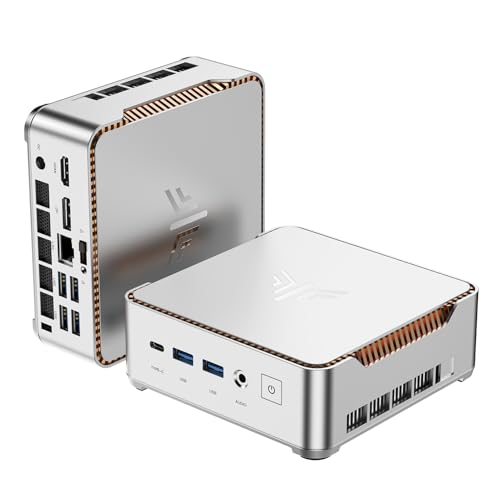
- Ryzen 4300U true 4-core processor
- Triple 4K@60Hz display support
- 16GB RAM with 512GB SSD and dual M.2 slots
Best For: home offices, conference rooms, and triple-monitor setups
Compact Gaming Mini PC

- Ryzen 7 7730U with 8 cores/16 threads
- 32GB RAM, 512GB SSD, and dual 2.5G LAN
- Supports triple 4K display output
Best For: multitasking, light gaming, and network-focused home or office use
Gaming Mini PC – GMKtec M7 Ultra Ryzen 7 PRO 6850U
If you want a mini pc that can do more than basic office work, the GMKtec M7 Ultra brings a strong mix of gaming-friendly graphics, fast networking, and flexible display support. Its Ryzen 7 PRO 6850U and Radeon 680M graphics make it a practical pick for heavier multitasking, light AAA gaming, and creator-style workloads.
Best For: Users who want a compact mini PC for gaming, multitasking, and multi-monitor setups.
Pros:
- Ryzen 7 PRO 6850U with 8 cores and 16 threads for strong everyday and productivity performance
- Radeon 680M graphics with support for FSR 3.0+ and performance close to a GTX 1050 Ti
- Dual USB4, HDMI 2.1, and OCuLink for flexible high-bandwidth display and expansion options
- 32GB DDR5 RAM, 512GB PCIe SSD, and dual-slot storage expansion
Cons:
- Best suited to compact gaming and productivity rather than high-end discrete-GPU performance
- Many of its stronger features are aimed at users who will actually use multi-monitor or eGPU setups
- Upgrades are supported, but additional memory and storage are not included
Overall, this is one of the more capable mini PC options in this group if you care about graphics, connectivity, and expansion. It stands out most when you need a small desktop that can handle demanding everyday use without giving up modern ports.
Balanced Home Office Mini PC – KAMRUI Pinova P2 Ryzen 7330U
The KAMRUI Pinova P2 is a practical mini pc for users who want efficient everyday performance in a small footprint. With a Ryzen 7330U, 16GB of RAM, and triple 4K display support, it fits well in a home office, business desk, or travel-ready setup.
Best For: Home office users, business tasks, and compact setups with multiple monitors.
Pros:
- Ryzen 7330U with 4 cores, 8 threads, and Zen 3 efficiency for daily productivity
- Triple 4K@60Hz display output via HDMI, DisplayPort, and USB-C
- 16GB LPDDR4X RAM plus 256GB SSD with two storage expansion slots
- Very compact design with included VESA mount for space-saving installation
Cons:
- Not aimed at heavy gaming or workstation-class workloads
- Base storage is modest at 256GB before expansion
- Best value comes from users who need efficiency and monitor flexibility, not raw performance
For buyers who want a quiet, compact mini PC that handles office apps, web work, and multi-display productivity, this model is easy to recommend. It focuses on practical features rather than flashy extras, which makes it a strong fit for everyday use.
Office Value Mini PC – GMKtec G3 PRO Core i3-10110U
The GMKtec G3 PRO is a straightforward mini pc for office and business users who want dependable basics without a big footprint. Its Core i3-10110U, dual-channel 16GB RAM, and 512GB SSD make it a sensible choice for browsing, documents, and light multitasking.
Best For: Office work, business tasks, home theater use, and light server-style roles.
Pros:
- Core i3-10110U is positioned for stronger single-core performance and light multitasking
- 16GB DDR4 dual-channel RAM and 512GB SSD for quicker everyday responsiveness
- Two HDMI 2.0 ports support dual 4K@60Hz displays
- WiFi 6, Bluetooth 5.2, and 2.5GbE Ethernet provide flexible connectivity
Cons:
- Older CPU platform compared with newer low-power mini PC options
- Graphics are suitable for 4K playback, not demanding gaming
- Storage expansion is useful, but the base configuration is still oriented toward everyday workloads
If you mainly need a compact desktop for email, office apps, monitors, and general business work, this model keeps things simple. It offers the right mix of ports and practical performance for users who value stability over premium extras.
Budget Everyday Mini PC – BOSGAME E4 Air Ryzen 5 3500U
The BOSGAME E4 Air is a budget-friendly mini pc designed for everyday computing, simple multitasking, and basic media use. With a Ryzen 5 3500U, Vega 8 graphics, and support for three 4K displays, it covers the essentials for home or small-office use without adding complexity.
Best For: Buyers who want an affordable mini PC for daily tasks, streaming, and light productivity.
Pros:
- Ryzen 5 3500U with 4 cores and 8 threads for routine multitasking
- Radeon Vega 8 graphics support 4K video streaming and triple-display output
- 8GB RAM and 256GB SATA SSD deliver a simple, ready-to-use baseline
- Dual RJ45 LAN, Wi-Fi 5, and Bluetooth 5.0 for flexible wired and wireless connections
Cons:
- 8GB RAM is modest for heavier multitasking
- SATA SSD is less performance-focused than faster PCIe alternatives
- Not intended for gaming-heavy or demanding professional workloads
As a basic mini PC, the E4 Air makes sense when you want low-drama performance for work, browsing, and media. It does not chase top-end speed, but it does offer a practical feature set for value-focused buyers.
AI-Ready Home Office Mini PC – GEEKOM A5 Ryzen 7 7730U
If you want a mini pc that can handle everyday work and a little more, the GEEKOM A5 is built around the Ryzen 7 7730U with 8 cores and 16 threads. It’s a practical fit for office tasks, video calls, coding, Photoshop, light editing, and multitasking, while staying compact enough for a home office or business setup.
Best For: Home office users, small businesses, and buyers who want a quiet, upgrade-friendly mini pc for productive multitasking.
Pros:
- Ryzen 7 7730U with Radeon Vega 8 graphics for dependable everyday performance
- 16GB DDR4 RAM and 512GB NVMe SSD, with room to expand memory and storage
- Supports up to four displays through dual HDMI and dual USB-C ports
- Quiet, low-power design with IceBlast 3.0 cooling for 24/7 use
Cons:
- 16GB RAM may be limiting for heavier creative or professional workloads
- Gaming and demanding content creation are not its main focus
- Expansion is available, but buyers may need to add upgrades later
Overall, the A5 stands out as a flexible mini pc for productivity-first buyers who value quiet operation, multiple display support, and upgrade paths. It makes more sense for work and everyday use than for high-end performance demands.
Performance Gaming Mini PC – GMKtec M6 Ultra Ryzen 5 7640HS
The GMKtec M6 Ultra is a performance-focused mini pc built around the Ryzen 5 7640HS and paired with 32GB of DDR5 memory and a 1TB SSD. It’s designed for buyers who want a compact system that can handle everyday computing, smoother multitasking, moderate gaming, and multi-monitor setups without taking much desk space.
Best For: Users who want a compact mini pc for gaming, fast multitasking, and triple-display productivity.
Pros:
- Ryzen 5 7640HS with 6 Zen 4 cores and up to 5.0 GHz boost
- 32GB DDR5 RAM and 1TB SSD, with room for further expansion
- Radeon 760M iGPU supports moderate gaming and AV1/HEVC/AVC encode-decode
- Triple display support, including 8K@60Hz via USB4
Cons:
- Gaming is positioned as moderate rather than high-end
- Only a 1-year warranty is included
- Maximum installed RAM is listed at 32GB, so upgrades may need planning
For a mini pc in this class, the M6 Ultra offers a strong mix of speed, memory, and display flexibility. It’s best suited to users who want more performance than a basic office box, while still keeping the footprint small.
Budget Triple-Display Mini PC – Getorli Ryzen 5 3501U
The Getorli mini pc is aimed at straightforward everyday use, combining a Ryzen 5 3501U processor with 16GB of RAM and a 512GB SSD. It’s a compact option for office apps, home entertainment, online learning, media playback, and light gaming, especially if you want triple-display support without moving to a larger desktop.
Best For: Budget-minded buyers, home office setups, and users who want a compact mini pc with easy multi-monitor support.
Pros:
- Ryzen 5 3501U with 4 cores and 8 threads for daily computing
- 16GB RAM and 512GB SSD, with upgrade paths for memory and storage
- Dual HDMI plus USB-C supports up to three displays
- Very small footprint with VESA mount support for behind-monitor installation
Cons:
- Processor and DDR4 platform are aimed at basic to moderate workloads
- Integrated graphics are best for light gaming rather than demanding titles
- Warranty is limited to 1 year
This mini pc makes sense if you want a compact, flexible machine for everyday tasks and monitor-heavy workflows. It focuses on practicality and space savings rather than raw performance.
AI Performance Mini PC – Ryzen 7 Pro 8845HS Power
If you want a mini pc that behaves more like a desktop tower, this Glorlin model is built for heavy multitasking, creative work, and gaming. The Ryzen 7 Pro 8845HS, Radeon 780M graphics, and DDR5 memory give it a clear performance focus, while the compact chassis keeps it desk-friendly.
Best For: Users who want a compact system for gaming, office productivity, content creation, and AI-assisted workflows.
Pros:
- Ryzen 7 Pro 8845HS with 8 cores and 16 threads for strong all-around performance
- Radeon 780M graphics and AI NPU support for gaming and smarter video-call features
- 1TB PCIe 4.0 SSD and 16GB DDR5 RAM for fast startup and smooth multitasking
- Two USB4 ports, HDMI 2.1, DisplayPort 1.4, and dual 2.5GbE for flexible connectivity
Cons:
- Ships with only 16GB RAM installed, which may be limiting for very heavy workloads
- Performance-oriented hardware may be more than casual users need
- Advanced features like BIOS performance modes may take some tuning
This is a strong choice if you want a mini pc that can handle demanding tasks without giving up much desk space. Its mix of CPU power, fast storage, and rich port selection makes it especially versatile for work and play.
Value Triple-Display Mini PC – Ryzen 4300U Everyday Workhorse
The KAMRUI Pinova P2 is a practical mini pc for users who want dependable everyday performance with excellent display flexibility. Its Ryzen 4300U processor, 16GB RAM, and 512GB SSD make it a solid pick for office work, streaming, and light creative use.
Best For: Home office users, conference rooms, and buyers who need triple 4K display support in a compact desktop.
Pros:
- True 4-core Ryzen 4300U offers stronger multitasking than N95 and i3-10110U-class systems
- Triple 4K@60Hz output through HDMI, DisplayPort, and USB-C
- 16GB LPDDR4 memory and 512GB SSD deliver quick, responsive everyday use
- Dual M.2 storage slots support expansion up to 4TB total
Cons:
- Not aimed at high-end gaming or demanding content creation
- LPDDR4 memory is not as fast as newer DDR5-based systems
- Focus is more on productivity than raw performance
For buyers who care more about stable multitasking and display output than maximum speed, this mini pc makes a lot of sense. It is especially appealing for workstations that need multiple monitors without taking up much space.
Compact Gaming Mini PC – Ryzen 7 7730U Dual-LAN Pick
The GMKtec M5 Ultra is a balanced mini pc for people who want more muscle than a basic office machine without moving up to a full tower. With a Ryzen 7 7730U, 32GB of RAM, and triple-screen support, it is geared toward productivity, light gaming, and home entertainment.
Best For: Buyers who want a versatile mini desktop for office work, media, gaming, and networking tasks.
Pros:
- Ryzen 7 7730U with 8 cores and 16 threads for solid everyday and multitasking performance
- 32GB dual-channel RAM and 512GB PCIe SSD provide a fast starting point
- Dual 2.5G LAN is useful for fast networking, servers, or firewall-style setups
- Supports three displays and includes WiFi 6E and Bluetooth 5.2
Cons:
- Uses DDR4 rather than newer DDR5 memory
- Base storage is 512GB, which may fill up quickly for media-heavy users
- Integrated graphics are fine for light gaming, not high-end graphics work
This mini pc stands out for its mix of strong CPU specs, generous memory, and network flexibility. It is a good fit if you want a compact system that can multitask well and still cover entertainment or light gaming.
How We Picked These Mini PCs
We focused on the core features that matter most in a Mini PC: processor performance, memory, storage, upgrade potential, display support, and connectivity. We also looked for a useful range of configurations, from budget-friendly everyday systems to higher-performance options for heavier workloads.
Because compact desktops can vary widely, we prioritized models that balance size with real-world usability rather than chasing specs alone.
Quick Comparison
If you want the simplest way to sort the list, think in terms of use case. Entry-level systems are best for web browsing, office apps, streaming, and basic schoolwork. Midrange Ryzen-based options are better for multitasking, multiple displays, and light creative work. Higher-end Mini PCs with stronger CPUs and faster integrated graphics are the best fit for gaming, content creation, and power users who want desktop-like responsiveness in a small chassis.
Key Buying Factors for a Mini PC
Processor and Graphics
The CPU is the biggest performance driver. Older chips can still handle basic work, but newer Ryzen 5, Ryzen 7, and Intel Core options generally offer smoother multitasking and better longevity. If you care about casual gaming or GPU-accelerated apps, integrated graphics quality matters just as much as raw CPU speed.
Memory and Storage
For most buyers, 16GB of RAM is the practical starting point. If you keep many tabs open, use creative software, or want a system that feels more future-proof, 32GB is a smart upgrade. Storage also matters: 512GB is a comfortable baseline, while 1TB gives more room for games, projects, and local media.
Ports, Display Support, and Networking
A strong Mini PC should offer enough USB ports, video outputs, and network options for your setup. Triple-display support can be a major advantage for productivity. Fast Wi-Fi and Ethernet are also worth paying attention to, especially if the system will be used as a primary workstation.
Cooling and Noise
Small systems have less room for heat management, so cooling quality can affect sustained performance and fan noise. If you plan to run heavier workloads for long periods, look for models known for stable thermals.
Who Should Buy Which Mini PC?
Buy a budget Mini PC if you mainly need a compact internet, office, or streaming machine. Choose a midrange model if you want a dependable daily driver with better multitasking and multi-monitor support. Go for a high-performance Mini PC if you want a small desktop for gaming, demanding productivity, or a cleaner all-in-one workspace without sacrificing speed.
In short, the best Mini PC is the one that matches your workload, display needs, and budget—not just the highest specs on paper.