Choosing the right desktop for coding is about more than raw CPU speed. The best systems for programming stay responsive with multiple apps open, handle virtual machines and containers well, and leave room for future upgrades.
In this roundup of desktop computers for programming, we focused on practical performance, reliable build quality, and value for developers who want a machine that can keep up with modern workloads.
Best 10 Desktop Computers for Programming Picks for 2026
AI Productivity Tower
Dell Core Ultra 7 Business Desktop

- 32GB DDR5 RAM for multitasking
- Supports multiple monitors for coding setups
- Tool-less design makes upgrades simple
Best For: Developers who want a secure, upgrade-friendly tower for programming
Compact Business Workstation

- Core i7-14700 with 20 cores and 28 threads
- Small form factor saves desk space
- Windows 11 Pro supports business use
Best For: Programmers who want a small, business-ready desktop with strong multitasking performance
Quiet AI Mini PC

- Core Ultra 9 185H with dedicated NPU
- 24GB LPDDR5 and 500GB SSD
- Supports Windows and major Linux distros
Best For: Developers and technical users who want a compact, quiet mini PC for programming and Linux-friendly workflows
Renewed Value Pick
Dell Optiplex 3060 for Everyday Coding

- 32GB RAM and 1TB SSD help with multitasking and fast storage access
- Intel i5-8500 is a solid fit for coding and office work
- Built-in Wi‑Fi, Bluetooth, and Windows 11 Pro simplify setup
Best For: Budget-minded programmers who want a capable renewed desktop
Modern Compact Choice
Dell Slim Desktop with Core Ultra 5

- Core Ultra 5 platform is aimed at productivity and multitasking
- Supports up to four FHD monitors or two 4K displays
- Tool-less access and TPM security suit home or business setups
Best For: Developers needing a compact desktop with strong monitor support
High-Performance Business Build
Custom Optiplex i7 DDR5 Desktop

- i7-12700K with 12 cores and 20 threads for heavy multitasking
- DDR5 RAM up to 64GB and SSDs up to 4TB
- Wi‑Fi 6, Bluetooth, TPM, and Windows 11 Pro support business use
Best For: Power users and programmers handling larger workloads
Enterprise Multitasker
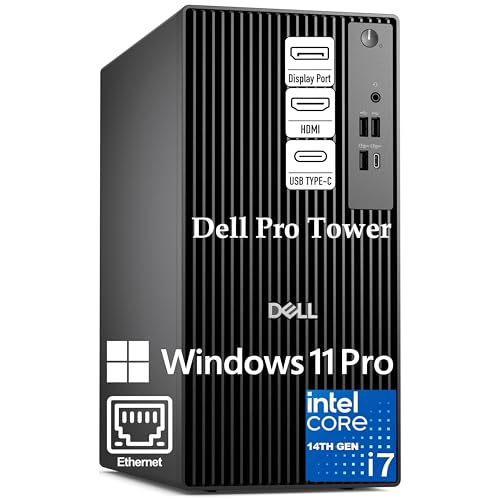
- 20-core i7 for coding and multitasking
- 16GB DDR5 RAM and 1TB PCIe SSD
- Windows 11 Pro with dual 4K support
Best For: Developers running IDEs, VMs, and Docker
Quiet Business Pick

- 14-core i5 for smooth daily coding
- 16GB DDR5 RAM with 512GB PCIe SSD
- Wi-Fi 6, Bluetooth, USB-C, Windows 11 Pro
Best For: Everyday programming in a business-ready tower
Developer Workhorse

- i7-12700K for fast development workloads
- 32GB DDR5 RAM and 1TB PCIe SSD
- Wi-Fi, Bluetooth, and dual 4K support
Best For: Heavier coding, multitasking, and larger local projects
AI Productivity Tower – Dell Core Ultra 7 Business Desktop
If you want desktop computers for programming that also handle everyday work and multitasking well, this Dell Tower Desktop is a strong business-oriented option. The Intel Core Ultra 7 processor, 32GB of RAM, and SSD storage give you a responsive setup for coding, testing, and keeping multiple tools open at once.
Best For: Developers who want a secure, upgrade-friendly tower for programming and general productivity.
Pros:
- Intel Core Ultra 7 processor with built-in AI support for productivity workflows
- 32GB DDR5 RAM helps with multitasking and larger development sessions
- Supports up to four FHD monitors or two 4K displays for a flexible workspace
- Tool-less entry and removable side panel make upgrades easier
Cons:
- Windows 11 Home is less business-focused than Pro editions
- Integrated graphics may not suit graphics-heavy development work
- Larger tower design takes more desk or floor space than a mini PC
Overall, this Dell is a practical choice if you value memory capacity, monitor flexibility, and straightforward expandability in a desktop for programming. It is especially appealing for home offices and small business setups that want a dependable tower with security features.
Compact Business Workstation – HP ProDesk SFF G9
For desktop computers for programming in a tight office or shared workspace, this HP ProDesk SFF 400 G9 offers a compact footprint with strong core performance. Its Intel Core i7-14700 processor, DDR5 memory, and SSD storage are a solid fit for coding, compiling, and juggling everyday dev tools.
Best For: Programmers who want a small, business-ready desktop with strong multitasking performance.
Pros:
- Intel Core i7-14700 with 20 cores and 28 threads for demanding multitasking
- Compact small form factor saves desk space
- DisplayPort and HDMI outputs support dual-display productivity
- Windows 11 Pro adds business security and management features
Cons:
- 16GB RAM is solid, but some programming workflows may want more
- Integrated graphics are fine for productivity, not heavy GPU work
- SFF design is less flexible than a larger tower for internal expansion
This HP is a sensible pick if you want a compact machine that still feels workstation-like for programming and office tasks. It balances performance, monitor support, and space savings better than many bulkier desktops.
Quiet AI Mini PC – GEEKOM IT13 MAX
If you’re shopping desktop computers for programming and prefer a compact setup, the GEEKOM IT13 MAX stands out for its small size and strong all-round performance. With an Intel Core Ultra 9 185H, 24GB of LPDDR5 memory, and a 500GB SSD, it is built for responsive multitasking, coding, and creative workloads without taking over your desk.
Best For: Developers and technical users who want a compact, quiet mini PC for programming and Linux-friendly workflows.
Pros:
- Intel Core Ultra 9 185H with a dedicated NPU for AI workloads
- 24GB LPDDR5 memory and 500GB SSD support smooth everyday performance
- Quiet cooling makes it suitable for offices, labs, and shared spaces
- Supports Windows and major Linux distros, including Ubuntu, Debian, and CentOS
Cons:
- 24GB LPDDR5 is soldered, so memory expansion is not highlighted here
- Mini PC format offers less internal upgrade room than a tower
- Best suited to productivity and development, not dedicated gaming or heavy discrete-GPU work
This GEEKOM is a smart pick if you want a space-saving programming machine with strong software flexibility. Its Linux support, quiet operation, and AI-focused hardware make it especially interesting for developers and power users.
Balanced Tower Bundle – ASUS V500 Core i7 Desktop
For desktop computers for programming that lean toward reliability and everyday speed, the ASUS V500 is a straightforward tower with a useful balance of performance and storage. Its Intel Core i7-13620H processor, 16GB of DDR5 memory, and 1TB SSD should be comfortable for coding, compiling, and running typical developer tools.
Best For: Programmers who want a dependable Windows 11 Pro tower with good storage and easy dual-monitor support.
Pros:
- Intel Core i7-13620H provides responsive performance for multitasking
- 1TB SSD offers generous storage for projects and applications
- HDMI and DisplayPort help support a multi-monitor workstation
- Windows 11 Pro adds business-focused security and management features
Cons:
- 16GB RAM is adequate but not as roomy as higher-memory workstations
- Integrated graphics limit it to productivity-focused workloads
- The bundled USB drive is useful, but not essential for core programming use
The ASUS V500 is a practical middle-ground choice for programmers who want a familiar tower with solid storage and business-ready software. It is a good fit for everyday development work, especially if you value Windows 11 Pro and a clean dual-display setup.
Renewed Value Pick – Dell Optiplex 3060 for Everyday Coding
If you want desktop computers for programming without paying for a new workstation, this renewed Dell OptiPlex 3060 is a practical pick. The Intel i5-8500, 32GB of RAM, and 1TB SSD give you enough headroom for coding, multitasking, and local development tools, while Windows 11 Pro and built-in Wi‑Fi make it easy to set up in a home office.
Best For: Developers who want a dependable, budget-friendly desktop for coding, testing, and everyday office use.
Pros:
- 6-core Intel Core i5-8500 with up to 4.1 GHz turbo for solid everyday development performance
- 32GB DDR4 RAM and 1TB SSD support multitasking and fast boot/load times
- Built-in Wi‑Fi and Bluetooth simplify desk setup
- Windows 11 Pro plus renewed pricing can make it a strong value choice
Cons:
- Integrated Intel UHD Graphics 630 is not aimed at graphics-heavy work
- Renewed unit comes with a 90-day warranty, which is shorter than new systems
- Older 2018-era platform may be less future-focused than newer desktop options
For programming tasks that prioritize RAM, storage, and reliability over cutting-edge hardware, this OptiPlex 3060 covers the basics well. It is best suited to code editors, browsers, and typical office workflows rather than demanding creative workloads.
Modern Compact Choice – Dell Slim Desktop with Core Ultra 5
This Dell Slim Desktop is a smart fit if you want desktop computers for programming in a smaller footprint. Its Intel Core Ultra 5 processor is built for productivity, and the slim design, tool-less access, and removable side panel make it easier to live with and upgrade as your needs grow.
Best For: Programmers who want a compact, modern desktop for coding, multi-monitor setups, and light business use.
Pros:
- Intel Core Ultra 5 with built-in AI support is designed to speed up everyday productivity tasks
- Supports up to four FHD monitors or two 4K displays for coding across multiple screens
- Tool-less entry and removable side panel make upgrades more convenient
- Hardware TPM chip, lock slot, and padlock loop add business-friendly security
Cons:
- 512GB SSD offers less storage than larger-capacity workstation-style desktops
- Integrated graphics mean it is not built for heavy GPU workloads
- Requires external speakers if you need audio output through speakers
Overall, this is a well-rounded option for developers who value a neat setup and modern connectivity. It is especially appealing if you work with multiple monitors and want a desktop that stays compact on the desk.
High-Performance Business Build – Custom Optiplex i7 DDR5 Desktop
For shoppers comparing desktop computers for programming, this customized business desktop is the most performance-focused option in the group. It combines an Intel i7-12700K, DDR5 memory up to 64GB, and SSD storage up to 4TB, making it a strong match for heavier multitasking, larger projects, and busy development environments.
Best For: Programmers who want a faster business desktop for demanding multitasking and large project workloads.
Pros:
- Intel i7-12700K with 12 cores and 20 threads is built for strong multitasking performance
- DDR5 RAM up to 64GB and PCIe M.2 SSD storage up to 4TB support fast, roomy setups
- Wide port selection includes USB-C, HDMI-in, HDMI-out, DisplayPort, Ethernet, and SD card reader
- Wi‑Fi 6, Bluetooth, TPM security, and Windows 11 Pro make it business-ready
Cons:
- More powerful configuration may be more than casual coders need
- Integrated Intel UHD Graphics 770 is not meant for serious graphics work
- It ships as a desktop package focused on business use rather than a budget value build
If you want the strongest specs here for development work, this is the clear step-up choice. It is best suited to users who keep many apps open, build larger projects, or simply want more room to grow.
Enterprise Multitasker – Dell Pro Tower i7-14700
For desktop computers for programming, this Dell tower is built to handle heavy development workloads without bogging down. The Intel Core i7-14700 with 20 cores and 28 threads is well suited for running multiple IDEs, virtual machines, Docker containers, and large code compiles at the same time, while the 16GB DDR5 RAM and 1TB PCIe SSD help keep projects, tools, and builds moving quickly.
Best For: Developers who need strong multitasking performance for coding, VMs, and business workflows.
Pros:
- 20-core Intel Core i7-14700 handles demanding multitasking and large codebases.
- 16GB DDR5 memory and 1TB PCIe SSD support fast launches and smooth project work.
- Windows 11 Pro adds BitLocker, remote desktop, and enterprise-friendly features.
- Dual 4K monitor support is useful for keeping code, docs, and tools visible at once.
Cons:
- No built-in Wi-Fi is included.
- Integrated graphics are not intended for graphics-heavy workloads.
- 16GB RAM is solid, but power users may eventually want more headroom.
This is a strong choice if your programming setup involves multiple apps, containers, and remote work tools. It leans more toward dependable productivity than flashy extras, which makes it practical for office or home development environments.
Quiet Business Pick – Dell OptiPlex i5-14500
Among desktop computers for programming, this Dell OptiPlex-style business tower stands out for balanced performance and a practical feature set. The Intel i5-14500 offers 14 cores and 20 threads with speeds up to 5.0 GHz, and the 16GB DDR5 memory plus 512GB PCIe SSD should keep everyday coding, testing, and multitasking responsive.
Best For: Programmers who want a quiet, business-ready desktop with solid everyday speed.
Pros:
- 14-core Intel i5-14500 is built for responsive multitasking and productivity.
- DDR5 memory and PCIe SSD support fast boot times and smooth app use.
- Includes Wi-Fi 6, Bluetooth, USB-C, and a broad port selection.
- Windows 11 Pro, TPM security, and lock options suit business setups.
Cons:
- 512GB storage is smaller than the other options here.
- Integrated graphics limit it to standard development tasks.
- Best for general programming rather than heavy local virtualization.
This model makes sense if you want a straightforward coding desktop with modern connectivity and security features. It is especially appealing for office desks or shared workspaces where quiet, reliable operation matters.
Developer Workhorse – Dell Tower i7-12700K
If you want a desktop computer for programming with more room to grow, this Dell tower brings a strong mix of speed and memory. The Intel Core i7-12700K, 32GB DDR5 RAM, and 1TB PCIe SSD are a practical combination for advanced multitasking, heavier development tools, content creation, and smooth everyday productivity.
Best For: Programmers who want extra memory and faster headroom for demanding workloads.
Pros:
- Intel Core i7-12700K delivers fast performance for demanding tasks.
- 32GB DDR5 RAM is ideal for heavier multitasking and larger projects.
- 1TB PCIe SSD provides quick boot times and ample storage.
- Wi-Fi, Bluetooth, USB-C, and dual 4K monitor support improve setup flexibility.
Cons:
- Integrated graphics are not meant for intensive visual workloads.
- It includes wired keyboard and mouse, which some buyers may replace.
- The specification list shows a processor socket mismatch, so buyers should verify the setup details.
This is the most balanced option for developers who keep many tools open or work with larger local environments. Its combination of 32GB RAM and a 1TB SSD makes it especially comfortable for long coding sessions.
How We Picked These Desktop Computers for Programming
We prioritized processors with strong single-core and multi-core performance, at least 16GB of RAM, fast SSD storage, and systems with sensible upgrade paths. For programmers, that means smoother compiles, faster dependency installs, better multitasking, and less waiting overall.
We also favored desktops with good connectivity, support for multiple monitors, and form factors that fit different workspaces, from compact mini PCs to tower systems with more expansion headroom.
Quick Comparison: What Matters Most
If you write code in lightweight editors, a capable midrange CPU and 16GB RAM may be enough. If you run Docker, VMs, local databases, or large projects, 32GB RAM and a newer Core i7 or Core Ultra chip are a smarter long-term choice. Mini PCs save space, while towers usually offer better cooling and upgrade flexibility.
Key Buying Factors for Desktop Computers for Programming
Processor
Look for modern Intel Core i5, i7, or Core Ultra processors with strong efficiency and enough cores for builds, background services, and multitasking. Developers working with heavy toolchains should lean toward higher-core-count chips.
Memory
16GB is the practical baseline for most coding work, but 32GB is better if you use IDEs, browser tabs, container stacks, or data tools at the same time. Memory upgrades can extend the useful life of a desktop significantly.
Storage
An SSD is essential. Faster NVMe storage helps with boot times, project loading, and large file transfers. For bigger local environments, 1TB or more is often worth the extra cost.
Expansion and Displays
Check for additional RAM slots, extra SSD bays, and support for dual monitors or even 4K displays if your workflow depends on screen space. Many programmers benefit from a second display for documentation, terminals, and debugging.
Who Should Buy Which Desktop Computers for Programming?
If you want the best all-around balance, choose a newer tower desktop with a strong i7 or Core Ultra processor and 32GB RAM. If space is limited, a mini PC can still be an excellent programming machine as long as it has enough memory and storage. Budget-conscious buyers can save with older-generation systems, but should make sure the RAM and SSD are still sufficient for modern development tools. For power users, the best Desktop Computers for Programming are the ones that combine fast performance today with easy upgrades tomorrow.