Choosing the right desktop computer for architects means balancing CPU speed, professional graphics, memory capacity, and storage responsiveness. The best systems handle CAD, BIM, rendering, and large project files without slowing down your workflow.
Below, you’ll find 10 desktops selected for different needs, from high-end workstation-style towers to budget-friendly office PCs that can still manage design tasks well.
Best 10 Desktop Computer for Architects Picks for 2026
High-End Workstation Pick
Dell Pro Max Tower T2 with RTX 2000 Ada
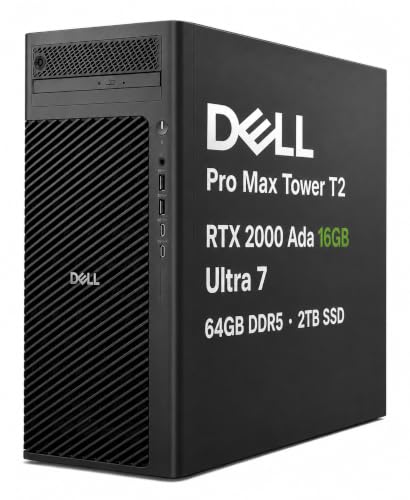
- RTX 2000 Ada 16GB for pro graphics
- Core Ultra 7, 64GB RAM, 2TB SSD
- Supports up to four displays
Best For: Architects needing workstation-grade power for CAD and rendering
Budget Refurbished Option
Dell Optiplex 3060 Value Tower

- Core i5, 32GB RAM, 1TB SSD
- Wi-Fi and Bluetooth included
- Good for lighter drafting and office work
Best For: Budget-minded architects needing a dependable everyday desktop
Pro Graphics Alternative
Dell Pro Max Tower T2 with Radeon PRO W7500

- Radeon PRO W7500 8GB for pro graphics
- Core Ultra 7, 64GB RAM, 2TB SSD
- Supports up to four monitors
Best For: Architects who prefer AMD pro graphics for CAD and multitasking
Value Office Tower
HP ProDesk 600G4 for Everyday Design Work

- Core i7-8700 and 32GB RAM
- 1TB SSD for quick responsiveness
- Good connectivity for monitors and peripherals
Best For: Architects needing an affordable tower for office and light design work
Quiet Office Pick
Dell OptiPlex Business Desktop for Architects

- Intel Core i3-13100 for dependable office multitasking
- Up to 64GB DDR5 and 4TB SSD support
- Dual-monitor-ready with USB-C, HDMI, DisplayPort, and Ethernet
Best For: Architects needing a quiet desktop for documentation and everyday workflow
Budget Starter
HP Tower 290 G9 for Office Architects

- 13th Gen Intel quad-core chip for everyday work
- 256GB SSD for quick startup and app loading
- Wi-Fi, HDMI, VGA, Ethernet, keyboard, and mouse included
Best For: Cost-conscious architects needing a simple office workstation
Powerhouse Choice
Dell OptiPlex Tower for Architects

- Core i9-12900K with up to 5.2 GHz boost
- 32GB DDR5 RAM and 1TB PCIe SSD included
- Dual 4K monitor support with USB-C, DisplayPort, and HDMI
Best For: Architects who need fast multitasking and room for larger project files
Compact AI Desktop
Dell Slim Desktop for Modern Work

- Core Ultra 5 with built-in AI support
- Up to four FHD or two 4K displays
- Tool-less upgrades and TPM security
Best For: Architects needing a slim, multi-monitor office desktop
High-Performance Business Tower
Dell Pro Desktop for Multitasking

- 12-core Intel i7-12700K processor
- 32GB DDR5 RAM with 1TB PCIe SSD
- Dual 4K monitor support and Windows 11 Pro
Best For: Architecture teams wanting a fast business desktop for daily multitasking
Quiet Home Tower
HP Desktop for Everyday Studio Work

- Intel Core i5 with 16GB RAM
- Dedicated graphics and multiple video outputs
- Quiet microtower with WiFi adapter included
Best For: Home-based architects and students needing a simple everyday desktop
High-End Workstation Pick – Dell Pro Max Tower T2 with RTX 2000 Ada
If you want a desktop computer for architects that can handle CAD, 3D modeling, rendering, and other demanding creative work, this Dell Pro Max Tower T2 is built for the job. It pairs professional graphics with a fast Intel Core Ultra 7 processor, lots of memory, and plenty of storage for large project files.
Best For: Architects and design professionals who need a workstation-class tower for complex modeling, multitasking, and multi-display setups.
Pros:
- NVIDIA RTX 2000 Ada 16GB provides professional-grade graphics acceleration for design and visual computing.
- Intel Core Ultra 7 265 vPro, 64GB DDR5 RAM, and 2TB SSD deliver strong performance for heavy workflows.
- Supports up to four displays with Mini DisplayPort outputs, which is useful for expansive drafting and review work.
- Windows 11 Pro and ISV certifications add business-ready compatibility and reliability.
Cons:
- It is a large tower, so it is not the most compact option for smaller desks.
- The resealed-upgrade disclosure may matter to buyers who prefer factory-sealed systems.
Overall, this is the most capable option in the group for architects who prioritize workstation graphics and fast, dependable performance. It is especially appealing if your workflow includes large models, render-heavy projects, or multiple external monitors.
Budget Refurbished Option – Dell Optiplex 3060 Value Tower
This Dell Optiplex 3060 is a practical desktop computer for architects who need a budget-friendly office tower for lighter drafting, documentation, and everyday productivity. It combines a Core i5 processor, 32GB of RAM, and a 1TB SSD with Windows 11 Pro for a straightforward work setup.
Best For: Architects or office users who want an affordable desktop for basic design tasks, general productivity, and reliable everyday use.
Pros:
- 32GB DDR4 RAM and a 1TB SSD give it solid responsiveness for everyday workloads.
- Includes Wi-Fi and Bluetooth for easy wireless connectivity.
- Windows 11 Pro and DisplayPort/HDMI support make it simple to integrate into a work station.
- Renewed value pricing can make it attractive for cost-conscious buyers.
Cons:
- Integrated Intel UHD Graphics 630 is not ideal for demanding 3D rendering work.
- The older i5-8500 platform is less future-focused than newer workstation systems.
As a value choice, this tower makes sense when the priority is dependable daily performance rather than heavy visualization power. For architecture teams, it is best suited to support work, document handling, and lighter CAD use.
Pro Graphics Alternative – Dell Pro Max Tower T2 with Radeon PRO W7500
For buyers comparing a desktop computer for architects, this Dell Pro Max Tower T2 is a strong workstation-style option built around professional AMD graphics. With a Core Ultra 7 processor, 64GB of DDR5 memory, and a 2TB SSD, it is designed for demanding design workflows and multitasking.
Best For: Architects who want professional graphics performance with a balanced workstation setup for CAD, rendering, and multi-monitor productivity.
Pros:
- AMD Radeon PRO W7500 8GB offers professional graphics acceleration for design and architecture work.
- Intel Core Ultra 7 265 vPro, 64GB DDR5 RAM, and 2TB SSD support heavy multitasking.
- Four Mini DisplayPort outputs support up to four displays for an expanded workspace.
- Windows 11 Pro, Copilot, and ISV certifications help with business-ready workflows.
Cons:
- The 8GB graphics memory is lower than the RTX model in this lineup.
- It is still a full tower workstation, so desk space requirements are not minimal.
This is the better fit if you prefer AMD professional graphics and still want a serious workstation for architectural work. It should handle design, modeling, and office productivity with plenty of overhead.
Value Office Tower – HP ProDesk 600G4 for Everyday Design Work
The HP ProDesk 600G4 is a solid desktop computer for architects who need an affordable tower for office work, 2D drafting, and light content creation. Its Core i7 processor, 32GB of RAM, and 1TB SSD give it a responsive feel for everyday productivity tasks.
Best For: Architects looking for a lower-cost tower for document work, light design tasks, and general office use.
Pros:
- Intel Core i7-8700 and 32GB DDR4 RAM provide dependable everyday performance.
- 1TB SSD helps with fast boot times and quick loading of files and programs.
- DisplayPort outputs, USB-C, and multiple USB ports make it easy to connect office gear and monitors.
- Windows 11 Pro and Wi-Fi/Bluetooth add convenience for modern work setups.
Cons:
- Integrated Intel HD Graphics 630 is not built for demanding rendering or heavy 3D work.
- It is a renewed older-generation system with a 90-day warranty.
For architects who mainly need a reliable office desktop rather than a high-end rendering machine, this HP offers a practical balance of speed and affordability. It is best used as a general productivity tower with some light creative capability.
Quiet Office Pick – Dell OptiPlex Business Desktop for Architects
If you need a desktop computer for architects that handles everyday design workflow, client files, and dual-monitor desk setups, this Dell OptiPlex-style business tower is a practical starting point. Its Intel Core i3-13100, DDR5 memory support, and fast PCIe SSD options make it better suited to office productivity and light CAD-related multitasking than a basic budget PC.
Best For: Architects who want a quiet, business-ready desktop for documentation, multitasking, and dual-monitor office work.
Pros:
- Intel Core i3-13100 with up to 4.5 GHz boost for responsive everyday performance
- Up to 64GB DDR5 RAM and up to 4TB PCIe M.2 SSD support for larger files and smoother multitasking
- Dual monitor support plus HDMI-out, DisplayPort, USB-C, and Ethernet for a flexible workstation
- Includes wireless keyboard and mouse, with Windows 11 Pro out of the box
Cons:
- Integrated Intel UHD Graphics 730 is not aimed at heavy 3D rendering
- Base configuration ships with 16GB RAM, so some users may want more for demanding workloads
This Dell is a sensible fit if your architectural work is centered on drafting support, plans, presentations, and general office productivity. For heavier visualization or advanced modeling, the integrated graphics make it more of a workhorse than a high-end design machine.
Budget Starter – HP Tower 290 G9 for Office Architects
For buyers searching for a desktop computer for architects on a tighter budget, the HP Desktop Tower 290 G9 is a straightforward office machine. It pairs a 13th Gen Intel quad-core processor with 8GB RAM and a 256GB SSD, which is enough for email, documents, web-based work, and lighter design administration tasks.
Best For: Architects who need a low-cost desktop for office tasks, web apps, and simple workstation use.
Pros:
- 13th Gen Intel quad-core processor for routine business workloads
- 256GB SSD provides quick boot times and fast application loading
- Includes Wi-Fi, HDMI, VGA, Ethernet, keyboard, and mouse for easy setup
- Traditional tower design fits neatly under or beside a desk
Cons:
- 8GB DDR4 RAM is modest for heavier multitasking
- Integrated graphics and entry-level specs are not built for demanding rendering work
- 256GB storage may fill up quickly if you keep many project files locally
This HP tower makes sense when your architectural computer needs are basic and budget-led rather than performance-heavy. It is best treated as a reliable office workstation, not a machine for advanced visualization or large creative workloads.
Powerhouse Choice – Dell OptiPlex Tower for Architects
If you want a desktop computer for architects that is closer to a performance workstation, this Dell ECT1250 stands out. The Core i9-12900K, 32GB of DDR5 memory, and 1TB PCIe SSD make it well suited to large projects, heavy multitasking, and faster workflow when you are juggling demanding professional software.
Best For: Architects who need strong CPU performance and ample memory for larger files, multitasking, and demanding office workflows.
Pros:
- Intel Core i9-12900K with up to 5.2 GHz boost for high-speed performance
- 32GB DDR5 RAM and 1TB PCIe SSD offer strong headroom for projects and storage
- Dual 4K monitor support plus DisplayPort, HDMI, USB-C, and SD card reader
- Windows 11 Pro and included keyboard/mouse make it ready for business use
Cons:
- Integrated Intel UHD Graphics 770 is still not a dedicated workstation GPU
- Higher-end specs may be more than you need for simple office work
For architects who prioritize CPU speed, storage, and multitasking, this Dell is the strongest option in the group. It is especially appealing if your day includes large files, multiple displays, and a mix of design-adjacent and business productivity tasks.
Compact AI Desktop – Dell Slim Desktop for Modern Work
If you’re shopping for a desktop computer for architects who need a compact, practical system for drafting, presentations, and everyday office work, this Dell Slim Desktop keeps the setup simple. It supports up to four FHD monitors or two 4K displays, making it a strong fit for multi-screen workflows in a small workspace.
Best For: Architects and design professionals who want a slim business desktop with easy multi-monitor support.
Pros:
- Intel Core Ultra 5 processor with built-in AI for productivity-focused tasks
- Supports up to four FHD monitors or two 4K displays
- Tool-less entry and removable side panel make upgrades easier
- Hardware TPM security chip and lock slot help protect data and the system
Cons:
- Integrated Intel UHD Graphics 730 may not suit heavy 3D rendering workloads
- Windows 11 Home is less business-focused than Pro editions
- 512GB SSD may feel limited for large project libraries and archives
This is a sensible pick if your architecture workflow centers on drawings, client reviews, and multiple displays rather than demanding visualization. Its slim design and business-friendly features make it easy to place in a studio, office, or home workspace.
High-Performance Business Tower – Dell Pro Desktop for Multitasking
For a desktop computer for architects who spend their time juggling plans, reference files, and office applications, this Dell Pro Business Desktop offers stronger headroom. With a 12-core Intel i7-12700K, 32GB of DDR5 RAM, and a 1TB PCIe SSD, it is built for fast multitasking and responsive everyday use.
Best For: Architecture offices and power users who want faster multitasking and generous memory.
Pros:
- 12-core Intel i7-12700K handles multitasking and light creative work well
- 32GB DDR5 RAM and 1TB PCIe SSD provide strong baseline speed and storage
- Supports dual 4K monitors for productive side-by-side workflows
- Windows 11 Pro, TPM security, and included keyboard/mouse help complete a business setup
Cons:
- Integrated Intel UHD Graphics 770 is not aimed at intensive graphics rendering
- Bulky tower design may take more space than a slim desktop
- Best suited to productivity tasks rather than heavy visualization workloads
If your architecture work is mostly CAD, documentation, coordination, and multi-window productivity, this is the strongest all-around option here. It balances speed, storage, and connectivity in a package that feels ready for a professional desk.
Quiet Home Tower – HP Desktop for Everyday Studio Work
If you want a desktop computer for architects that can handle office tasks, reference browsing, and light creative work at home, this HP tower is a straightforward choice. It pairs an Intel Core i5 processor with 16GB RAM and a 256GB PCIe SSD, and it stays practical with multiple display outputs and quiet operation.
Best For: Home offices, students, and light-duty architecture users who need a simple ready-to-use tower.
Pros:
- Intel Core i5 and 16GB RAM are solid for everyday productivity
- Dedicated graphics with HDMI, DVI, and VGA support multiple monitors
- Includes WiFi adapter, keyboard, mouse, and Windows 11 Pro
- Compact microtower design and quiet operation suit home environments
Cons:
- 256GB SSD is modest for large design files and archives
- Older Core i5-10400F platform is less powerful than the Dell options
- Not ideal for demanding 3D workflows or heavy visualization work
This HP desktop makes sense when you need a dependable, quiet machine for study, coordination, and general office use rather than high-end rendering. It delivers a complete starter setup without taking much desk space.
How We Picked the Best Desktop Computer for Architects
We focused on desktops that fit real architectural workflows: drafting in AutoCAD, model navigation in Revit, visualization in SketchUp, and multitasking across large file sets and browser-heavy research sessions. For a Desktop Computer for Architects, the most important factors are sustained CPU performance, enough RAM for complex projects, fast SSD storage, and graphics hardware that can keep up with 2D and 3D work.
We also considered expandability, quiet operation, business reliability, and how well each system matches different budgets and office setups.
Quick Comparison
At the top end, the Dell Pro Max Tower T2 systems with RTX 2000 Ada or Radeon PRO W7500 are the most workstation-ready choices for heavier 3D workloads. The Dell ECT1250 with an i9-12900K and DDR5 memory is a strong CPU-first option for users who prioritize modeling, multitasking, and general responsiveness. Midrange business towers with Intel Core i7 CPUs and 32GB RAM offer the best value for many architects, while entry-level desktops are better suited to 2D drafting, document work, and lighter model editing.
Key Buying Factors for a Desktop Computer for Architects
Processor
Look for a modern Intel Core i7, Core i9, or Intel Ultra processor if you work with large models, frequent viewport changes, or rendering. A strong CPU matters more than many buyers expect, especially for BIM coordination and export tasks.
Memory
16GB is a minimum for light use, but 32GB is the safer choice for most architects. If your projects are large or you keep several design apps open at once, higher-capacity memory will improve stability and reduce slowdowns.
Graphics
Integrated graphics can work for basic office use and simpler CAD projects, but dedicated GPUs are preferable for 3D navigation, visualization, and more demanding creative software. Professional-grade NVIDIA RTX or AMD Radeon PRO cards are especially appealing for workstations.
Storage
An NVMe SSD is important for fast boot times, quick file access, and smoother project loading. For a Desktop Computer for Architects, 1TB is a practical starting point if you store active jobs locally.
Expandability and Noise
Architects often need room to add RAM, storage, or a more capable GPU later. Quiet cooling also matters in shared offices, where a low-noise tower can improve day-to-day comfort.
Who Should Buy Which Desktop Computer for Architects?
If you handle heavy 3D visualization or large project files, choose one of the Pro Max towers with professional graphics. If you want the best balance of speed and price, the Core i7 and 32GB RAM business towers are the sweet spot for many firms. If your work is mainly 2D drafting, admin, or lighter design tasks, a more modest desktop can still be a smart, cost-effective fit.
In short, match the desktop to your software, file sizes, and upgrade plans rather than buying more power than you’ll use. The right system should keep your design process fast, reliable, and easy to scale.